


If you've ever built a Tableau dashboard and wondered:
"Why isn't my calculation changing when I apply a filter?"
or
"How can I calculate something at a different level than what's shown in the view?"
then you need to understand two things:
- Tableau's Order of Operations
- Level of Detail (LOD) Expressions
So, What is an LOD?
LOD stands for Level of Detail.
It allows you to tell Tableau:
"Calculate this metric at a different level than what I'm showing in the view."
Imagine you're looking at sales by Category.
Without an LOD:
Furniture → £700K
Technology → £800K
Office Supplies → £600K
Tableau calculates everything at the Category level because that's what is displayed.
With an LOD, you can ask:
"Calculate sales per customer even though I'm only showing categories."
FIXED LOD
FIXED tells Tableau exactly which level to use.
{ FIXED [Customer Name] : SUM([Sales]) }
What Tableau does:
Customer John → £5,000
Customer Sarah → £8,000
Customer Mike → £3,000
Even if Customer Name is not visible in the chart, Tableau still calculates the result at the customer level.
INCLUDE LOD
INCLUDE adds more detail than what's currently visible.
{ INCLUDE [Customer Name] : SUM([Sales]) }
View:
Category
Furniture
Technology
Office Supplies
Tableau calculates behind the scenes:
Category + Customer
Then rolls everything back up to Category.
EXCLUDE LOD
EXCLUDE removes detail from the current view.
{ EXCLUDE [Sub-Category] : SUM([Sales]) }
View:
Category
Sub-Category
Sales
Even though Sub-Category is displayed, Tableau ignores it for the calculation.
When Should I Use Each LOD?
Use FIXED when you want a fixed business metric
-Total Sales per Customer
-Customer Lifetime Value
-First Purchase Date
Use INCLUDE when you need more granularity
-Average Sales per Customer
-Average Sales per Order
Use EXCLUDE when you need higher-level totals
-Percent of Category
-Share of Region
-Contribution Analysis
So, what is Order of Operations?
Many Tableau problems happen because Tableau does not execute everything at the same time.
Instead, Tableau follows a specific sequence:
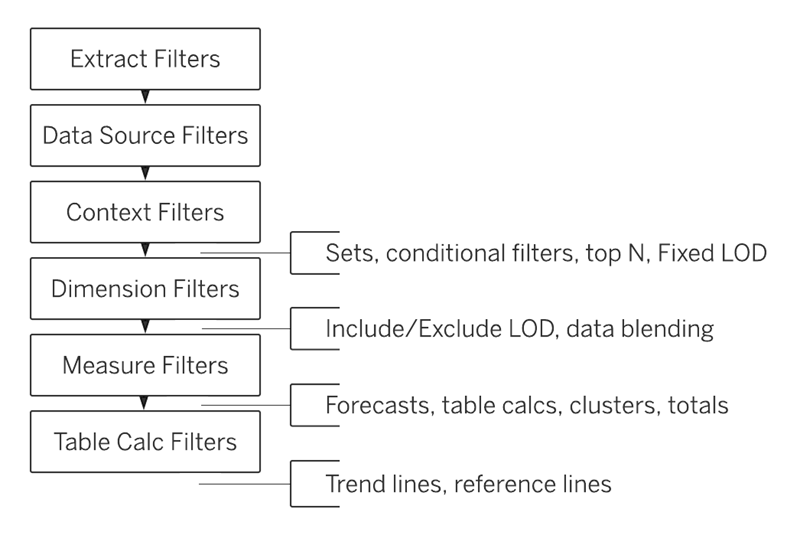
The most important thing to remember is:
FIXED LODs are calculated before Dimension Filters.
INCLUDE and EXCLUDE LODs are calculated after Dimension Filters.
This single concept explains most LOD behavior.
How a Dimension Filter Affects a FIXED LOD
Imagine you have sales data:
- John sold £100 in the East region.
- John sold £200 in the West region.
You create this FIXED LOD:
{ FIXED [Customer Name] : SUM([Sales]) }Tableau calculates:
John = £300because it adds all of John's sales together.
Now you add a Dimension Filter:
Region = WestYou might expect John's sales to become:
John = £200But they don't.
The result is still:
John = £300Why?
Because Tableau works in this order:
1. Calculate FIXED LOD2. Apply Dimension FilterSo Tableau calculates John's total sales (£300) before looking at the Region filter.
What About INCLUDE and EXCLUDE?
INCLUDE and EXCLUDE work differently.
For them, Tableau works like this:
Apply Dimension Filter
↓
Calculate LOD
So if you filter:
Region = WestTableau removes the East records first.
Then it performs the calculation.
As a result:
John = £200The Rule to Remember
FIXED ignores Dimension Filters.
INCLUDE and EXCLUDE respect Dimension Filters.
This is the most important concept to understand when working with LODs in Tableau.