


In Snowflake, tables aren’t one-size-fits-all - picking the right one is the secret to balancing performance with your budget. From standard storage to specialised formats for logs and external data, knowing your options is the first step towards a more efficient data pipeline.
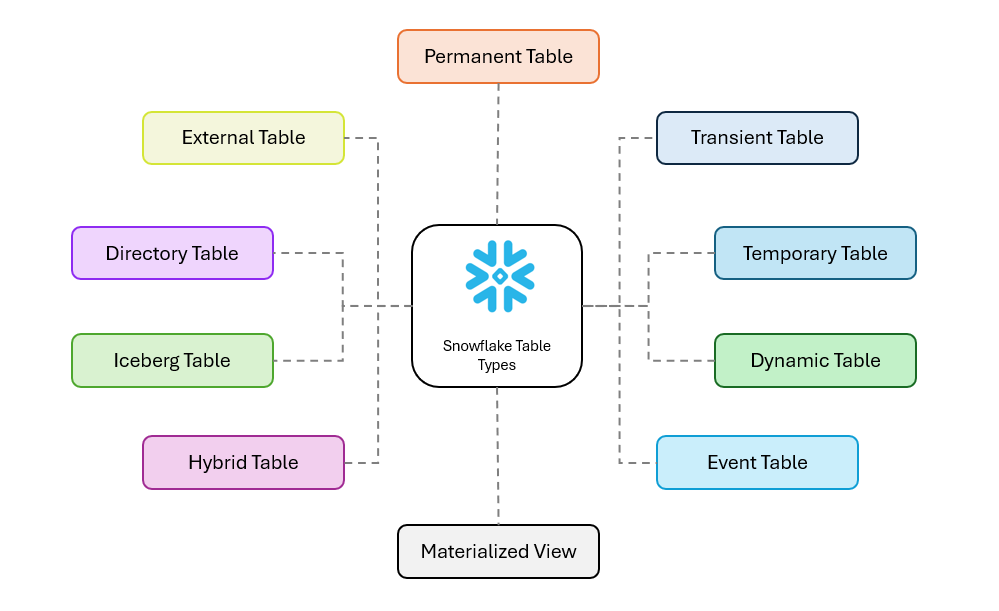
Permanent Tables
Think of these as the standard workhorses of your Snowflake environment. If you run a CREATE TABLE command without specifying a table type, this is exactly what you get.
The default choice: Designed for critical data that you need to store reliably and access indefinitely.
Maximum protection: Permanent tables provide the highest level of built-in data protection, featuring non-configurable Fail-safe (7 days of Snowflake-managed disaster recovery) and configurable Time Travel (up to 90 days, depending on your Snowflake edition).
Cost consideration: That extra protection comes at a cost. Compared to transient and temporary tables, permanent tables typically incur higher storage costs due to retained Time Travel history and mandatory Fail-safe storage. This makes them the most expensive option for high-churn tables, so they are best reserved for your true "source of truth" data.
In layman's terms: The high-security vault; this is your default storage where critical data is kept safe, backed up, and recoverable even after disasters.
Transient Tables
Transient tables strike a balance. Unlike temporary tables, they persist across sessions and are visible to all users until explicitly dropped. This makes them ideal for staging data, intermediate ETL steps, or any dataset that needs to be shared but can be easily regenerated if lost.
The middle ground: Ideal for staging data, intermediate ETL steps, or any dataset that can be easily regenerated if lost.
Reduced protection: Transient tables do not include Fail-safe and support Time Travel for up to one day maximum, regardless of Snowflake edition.
Cost efficiency: By eliminating Fail-safe storage and limiting historical retention, transient tables offer a cost-effective option for non-critical or easily reproducible workloads.
In layman's terms: The whiteboard; data stays there for the team to see until you wipe it off, but it lacks the expensive "insurance policy" (Fail-safe) of the vault.
Temporary Tables
These are the short-lived scratchpads of the Snowflake world. A temporary table exists exclusively for the duration of the web session or connection that created it.
Session-specific: The table is private to your session; other users (even with the same permissions) cannot see or access it.
Automatic clean-up: Once you log out or your session expires, the table is automatically dropped, ensuring you don’t leave a mess behind.
Limited recovery: Temporary tables support Time Travel for up to one day (default to 1, unless you explicitly set it to 0).
Best for: Testing code, performing one-off calculations, or holding volatile data that doesn’t need to be saved.
In layman's terms: The scratchpad; you use it for quick calculations during a single work session, and it is automatically shredded the moment you log off.
Dynamic Tables
Dynamic tables streamline your data pipelines by automatically refreshing based on a defined query and a target level of freshness. Instead of managing manual updates or complex schedules, you declare how the data should be transformed, and Snowflake handles the background processing.
Automatically refreshed: You define a target “lag” (freshness), and Snowflake incrementally refreshes the table to stay in sync with its source objects.
Well-suited for SCD patterns: Dynamic tables work well for Slowly Changing Dimension use cases, allowing you to express SCD logic declaratively without complex orchestration—though the historical tracking logic must still be defined in the query.
Incremental updates: They are designed to be efficient by processing only rows impacted by upstream changes rather than reprocessing the entire dataset.
Cost & performance: While efficient, dynamic tables can become expensive if the target lag is set too aggressively on very large datasets. They are best suited for workloads with relatively small, incremental changes rather than massive daily overwrites.
In layman's terms: The self-updating report; you tell it what data you want, and it automatically refreshes itself in the background to stay current without you lifting a finger.
Event Tables
Event tables are a specialised type of table designed to capture logs, traces, and telemetry data rather than traditional business records.
The debugger’s best friend: They are essential for troubleshooting Stored Procedures, User-Defined Functions (UDFs), and Snowflake Native Apps.
Seamless integration: Event tables capture telemetry and log events emitted from your code using Snowflake-supported logging and observability functions, removing the need to build a custom logging pipeline.
Centralised diagnostics: By storing system events and errors in one place, event tables make it significantly easier to monitor application health and investigate failures. Note: While you can create many event tables, only one can be active for the account at a time.
Costs: These tables have a predefined schema and accumulate data rapidly. Be mindful of your logging levels (e.g., avoid leaving DEBUG on in production) to prevent unexpected storage costs.
In layman's terms: The flight recorder (black box); it automatically captures system logs and error messages from your code so you can investigate crashes later.
Materialized Views
If heavy aggregations are slowing down your dashboards, a materialized view acts as a pre-computed performance booster.
Stores results: Unlike a standard view—which executes its query every time—it physically stores query results to reduce repeated computation.
Great query speed: Because the heavy lifting is done in advance and maintained incrementally, query performance is dramatically improved, making materialized views ideal for aggregations on large datasets. Note: Snowflake materialized views are currently optimized for single-table aggregations, not complex multi-table joins.
Automatic maintenance: Snowflake automatically and incrementally maintains materialized views as underlying data changes, ensuring results remain transactionally consistent without manual refresh logic.
The Alteryx analogy: If you come from an Alteryx background, this is similar to caching a workflow step so you don’t have to re-run the entire process every time.
Serverless Billing: Unlike Dynamic Tables (which use your Warehouse), Materialized Views use Snowflake's serverless compute resources to maintain the data in the background. You are billed for "Serverless Compute" credits separately. This can get expensive if the underlying table changes constantly (high churn).
In layman's terms: The answer key; it pre-calculates the results of a difficult math problem and saves them, so you don't have to solve the equation from scratch every time you look at it.
Hybrid Tables
Hybrid tables are optimised for low latency and high throughput using index-based random reads and writes, bridging the gap between analytical and operational workloads.
The best of both worlds: Without diving into storage mechanics, hybrid tables are designed for both analytics and transactions, supporting high-volume inserts and updates alongside sub-second single-row lookups.
Blending workloads: They are uniquely suited to handling operational responsibilities within Snowflake without forcing a strict separation between OLTP and analytics—though they do come with some feature limitations compared to standard tables.
Key Technical Difference: Unlike standard tables where constraints are ignored, Hybrid Tables enforce Primary Keys and Unique Constraints. You cannot insert duplicate keys.
When to use them:
- Managing active user sessions in a web application
- Tracking stock levels in real time for retail operations
- Serving instant analytics on live data, such as order statuses
In layman's terms: The fast-lane checkout; unlike standard tables designed for heavy analysis, these are optimized for instantly finding or updating a single specific record (like a user's shopping cart).
Iceberg Tables
Iceberg tables bring the open-source Apache Iceberg format directly into the Snowflake ecosystem, offering flexibility for teams that want greater control over data storage.
Open format: They use the Apache Iceberg standard, meaning you own the data files in your cloud storage (such as S3 or Azure Blob Storage) while Snowflake provides the compute and query engine.
High Performance: Unlike traditional "External Tables" which can be sluggish, Iceberg tables are treated as first-class citizens. They support full DML (Insert/Update/Delete) and offer performance comparable to native Snowflake tables.
Single pane of glass: Snowflake extends its governance (Role Based Access Control, Masking Policies) to this external data, allowing you to manage it just like internal data.
Interoperability: Iceberg tables enable architectures where data can be shared across multiple engines (such as Spark) without sacrificing Snowflake’s governance or ease of use.
In layman's terms: The "bring your own storage" model; you keep your files in your own private cloud garage (open format), but hire Snowflake’s engine to come over and process them.
Directory Tables
Directory tables are best thought of as a built-in file explorer for unstructured data.
The file system view: Instead of storing business data, a directory table provides an automatically updated catalogue of files located in a Snowflake stage.
Metadata-rich: They store file-level metadata such as filenames, sizes, and last-modified timestamps rather than the file contents themselves.
SQL access: Directory tables allow you to query file inventories using standard SQL, making it easy to detect new or changed files that need processing.
Automation: When configured with cloud event notifications, the directory table auto-refreshes as soon as a file lands in storage, triggering downstream pipelines instantly.
In layman's terms: The file menu; it acts like a live inventory list, showing you exactly which files are sitting in a storage folder at any given moment.
External Tables
External tables provide a way to query data directly in your data lake without moving it into Snowflake.
Query without loading: They allow SQL queries against data stored in cloud services like AWS S3, Google Cloud Storage, or Azure Blob Storage without ingestion.
Schema-on-read: The structure is applied at query time, offering flexibility for semi-structured or evolving datasets.
Cost vs. speed: While generally slower and less optimizable than native tables, external tables are well suited for archival data or massive datasets where ingestion costs aren’t justified.
Read-only: Unlike Iceberg tables, standard external tables are read-only from Snowflake’s perspective; the underlying files cannot be modified using Snowflake SQL.
In layman's terms: The window; it lets you look at and read data sitting in another system (like S3) without actually moving a copy of that data into your database.