


The Architecture of Data: Why Your Model Needs Rooms, Not Just Storage
When building a house, you don't just throw bricks in a pile and hope a kitchen appears. You need a plan. Data works the same way. To make sense of information, we split the architecture into two main stages: Logical and Physical.
The Logical Layer: The Invisible Hallway
The Logical Layer is the "Floor Plan" of your house. It defines what is in the house and how the rooms connect, without worrying about whether the walls are made of bricks and cement.
- Focus: Business logic, relationships, and "what" data we are collecting and relating in order to use for further analysis.
- Key Feature: It uses Relationships (Noodles) and Logical Tables.
The Physical Layer: The Specialized Rooms
The Physical Layer is the actual construction of the house - the walls, the floorboards, and the specific rooms where your data lives. This is where the "blueprint" meets reality. While the blueprint tells you where the rooms should be, the Physical Layer is where the bricks are actually laid and the furniture is placed.
- Focus: Database performance, storage types, and "how" the data is saved.
- Key Feature: It uses "Tables" and "Columns" with specific technical constraints.
The "Smart Home" Model: Relationships without Joins
In traditional data building, people often try to "knock down walls" such as "Joining Tables" to get all their data in one place. But that does not always make sense.
Instead, we use the Logical Layer to create a "Smart Home". Every table stays in its own place, but they are all "connected" by a central system that knows exactly where to find each piece of information when you need it.
The Physical Layer: The Independent Rooms
In this model, the Physical Layer is a collection of specialized rooms. They exist independently. You are not merging them; you are just acknowledging they exist.
- Room A: (Table Order): Holds the data such as "OrderID" and the "Dispatch Date"
- Room B: Holds the data such as the "Order Date" and "Delivery Mode"
- Those various tables can be still concatenated by Joins, Unions and Blends
... and also other rooms to follow...
The Logical Layer: The Smart Hallway"
This is where the magic happens. The Logical Layer does not move the furniture; it just creates the depending relationships. It says: "I know these look like two different rooms, but they are actually talking about the same house."
By selecting only specific Field Names and lining them to Remote Fields, you are creating a "Virtual View."
The Relationship Example: Selective Connection
One does not need the whole room; one just needs specific items. Here is how your data fields look when you pick and choose from the physical table to build your logical relationships:
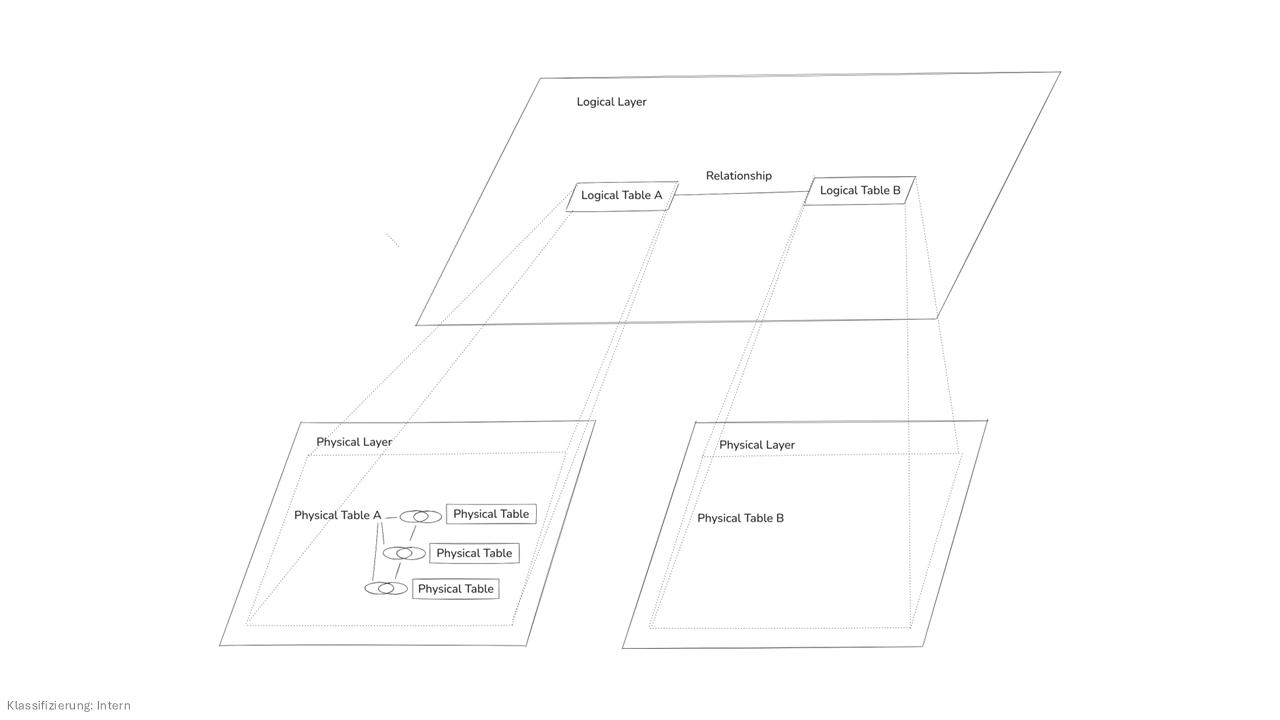
The Connection Map
The Physical Layer (Joins)
In the Physical Layer, you are creating a merged result set. The tables are fused together into a single, flat table before Tableau even starts looking at you charts.
|
Order ID
(Orders) |
Order Date |
Order ID
(Shipping) |
Dispatch
Date |
Ship Mode |
|
5001 |
2024-01-10 |
5001 |
2024-02-12 |
First Class |
|
5002 |
2024-01-11 |
5002 |
2024-01-15 |
Standard |
|
5003 |
2024-01-12 |
Null |
Null |
Null |
The Logical Layer (Relationships)
In the Logical Layer, the tables stay in their own "rooms". They are connected by a Relationship (The Noodle) on the OrderID field. They only exchange information when you build a specific viz.
|
Logical Table:
Orders |
|
Logical Table:
Shipping |
|
OrderID (Key) |
|
OrderID |
|
Order Date |
|
Dispatch Date |
|
Customer |
|
Ship Mode |

Why this Relationship approach is better then Joining:
- No Clutter: You only pull the fields you actually need for analysis. If the "Order" table has 50 other columns you do not care about, the Logical Layer ignores them.
- Speed: Because you are not physically merging tables into giant new file, the database (any of the rooms) stays organized and fast.
- Flexibility: If you decide to add a "Return Date" from a third table later, you just build another relationship "hallway" without having to rebuild the whole database (house).
Conclusion: The Power of the "Remote Control" Analysis
By building a Logical Layer that sits on top of you Physical Tables, you are effectively creating a "Universal Remote" for your data house. Instead of having to walk into one of the rooms, open five different heavy boxes, and dump then on the floor just to see when a packake arrives, you simply press a button in the living room.
Why this changes everything for Analysis:
- The User's View stays "Clean": Your analysis tools such as PowerBI or Tableau only see the labeled fields chosen. They don't see the messy "Physical Table" names or the 500 columns of metadata not needed.
- No Stress: If the database administrator decided to move to the "Order Date" to a different physical table in the basement, reports do not have to be rewritten. Just update the Logical Layer to point to the new location.
- Speed to Insight: Relationships are faster to build and maintain the complex SQL joins. This means you can spend less time being an "architect" and more time being an " analyst."
The Final Word: A great data model is not about how much data can be crammed into one room, it's about how easily data can be found across many rooms. Keep your Physical Layer organized and your Logical Layer connected, and your "Data House" will stand strong.