


In a recent exercise, we were given an Alteryx challenge and asked to understand the workflow well enough to explain it to others. Here's my breakdown of how it works.
The goal of the challenge was to find numbers whose sum of digits, raised to the power of the digit count, equals the number. So, for example, 81 is 2 digits, and the sum of 8 and 1 is 9. We then put this to the power of the length of digits, which is 9^2 = 81, so this would be an acceptable answer. The guidelines stated that only 13 numbers under 100,000 met this criterion.
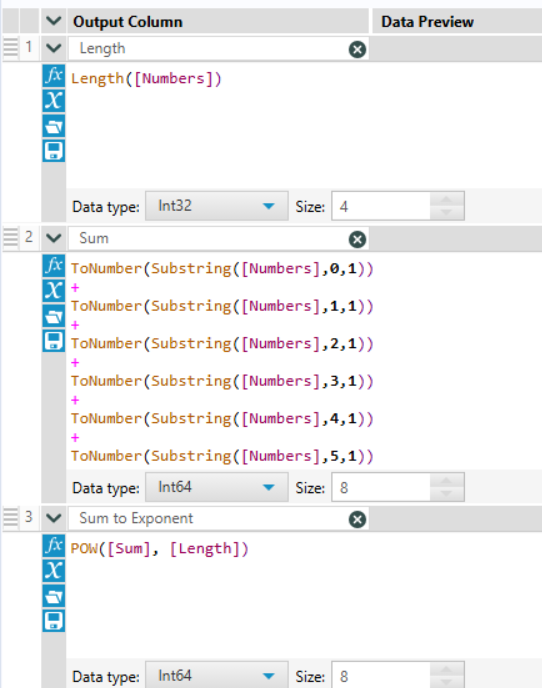
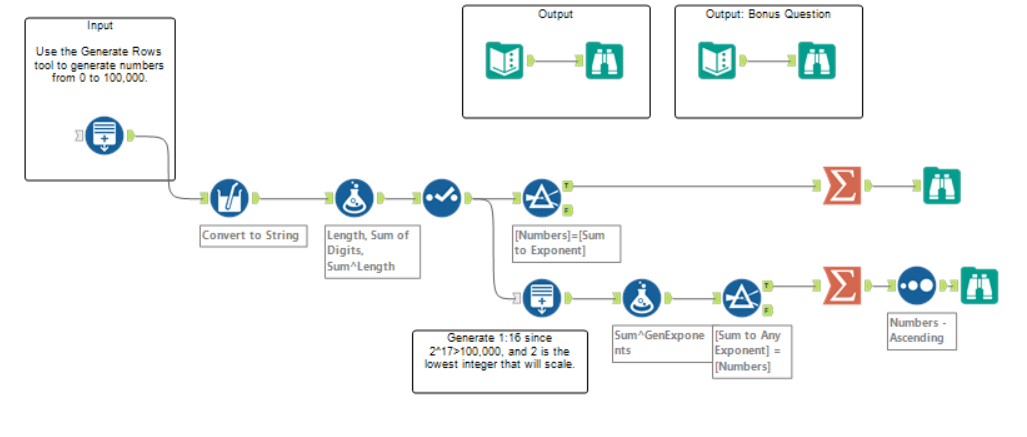
The challenge instructed us to start by using the Generate Rows to generate numbers from 0 to 100,000. The generated data was in integer form, and the column was named Numbers. To get the length of the data (to raise it to the length), we had to convert it to a string. We did this with a multi-field tool; however, it could easily have been done with a select tool, as it is only 1 field. This was then connected to a formula tool, creating the field “Length” with the formula Length([Numbers]). A formula called “Sum” was created, which will add each index to the others,
ToNumber(Substring([Numbers],0,1)) + ToNumber(Substring([Numbers],1,1)) + ToNumber(Substring([Numbers],2,1)) + ToNumber(Substring([Numbers],3,1)) + ToNumber(Substring([Numbers],4,1)) + ToNumber(Substring([Numbers],5,1))
For example with 81, ToNumber(Substring([Numbers],0,1)) returns 8, and ToNumber(Substring([Numbers],1,1)) returns 1. Summing these numbers together gives us 9.
Since Generate Rows produces numbers with up to 6 digits (100,000), we build one Substring line for each possible digit position. Values with positions beyond the number's actual length return blank/null, which Alteryx treats as 0 in the sum.
We then created a final field called Sum to Exponent using the formula POW([Sum], [Length]), which puts the sum of the values to the power of the length.
We then used the filter tool to filter for [Numbers]=[Sum to Exponent]. These output numbers were those that equaled the sum of their digits raised to the power of their digit length.
The final output included 13 numbers, which included all of the numbers under 100,000 that satisfy this condition:
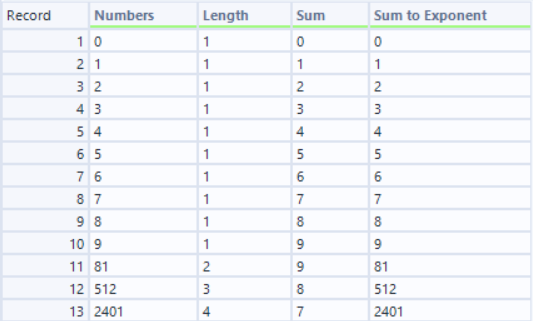
The first 10 are single-digit cases, with a single digit raised to the power of its length (1) will always equal itself; these are inferred. However, it gets interesting with 81 as stated earlier, 512 (5+1+2=8, 8³=512), and 2401 (2+4+0+1=7, 7⁴=2401). Lastly, a summarizing tool was used to keep only the numbers that satisfied the conditions for a clean output
Bonus Question:
The bonus challenge included an adjustment to the condition: qualifying numbers are those equal to the sum of their digits, raised to any nth power. For example, the number 4913 would fail the first task, with length 4 and sum 4+9+1+3 = 17; this comes out to 174 = 83521. However, it satisfies the condition of any nth power, as 173 = 4913.
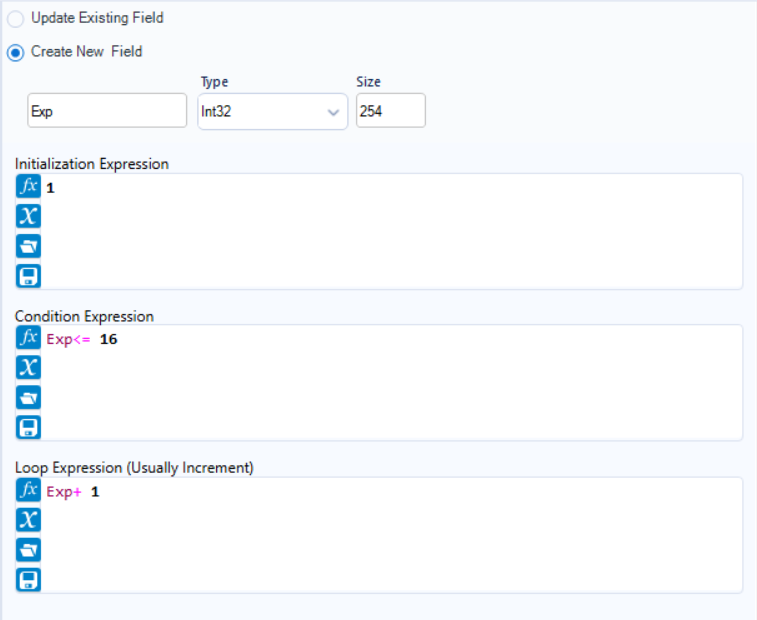
A branch was created using the select tool, retaining the length and sum values from 1 to 100,000. A generate rows tool was then used, with the Initialization Expression being 1, the Conditional Expression being Exp <= 16, and the loop expression being Exp+1. We set the conditional expression to <= 16 since 217 > 100,000, so 16 is the maximum exponent needed. The Generate Rows tool runs once for each incoming row. So for every single row that comes into the tool, it starts at Exp = 1 and keeps looping (Exp + 1) as long as the condition (Exp <= 16) is true. So the number 0 comes in as one row and comes out as 16 rows (Exp 1 through 16), each with Numbers = 0 but a different Exp. The same thing happens for every other row in the dataset.
This was then connected to a formula tool using POW([Sum], [Exp]). This formula generates a number for every combination of a base and an exponent. As before, this was connected to a filter tool with a custom filter of [Sum to Any Exponent] = [Numbers] to keep only values where the number equaled any Nth exponent up to 16.
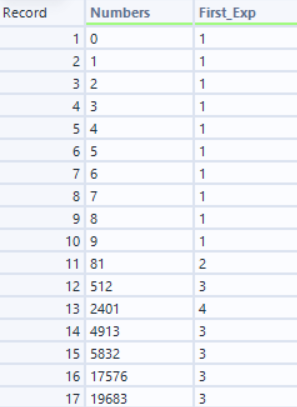
The final output included 17 numbers, with the extra 4 numbers being 5832, 19683, 4913, and 17576, all raised to the power of 3. A summarization tool was used to keep only the numbers and exponents that fit the criteria, and to sort them by Numbers in ascending order.
This challenge was fun to work on and understand, as it forced me to think about string manipulation and iteration in a way I hadn't really before. If you try this challenge yourself, I'd recommend starting with the base case first before jumping to the bonus.
The full workflow below shows both branches: the top branch solves the base task, and the bottom branch solves the bonus question.
If you want to download the completed workflow yourself, you can use this link.