


I have written a blog about Row context and Filter context, another important DAX concept is context transition.
Context transition happens when DAX converts an existing row context into filter context.
Example
Let's say we have a table called Sales
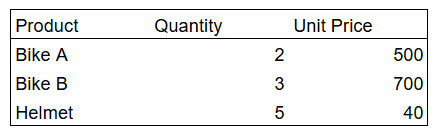
First, create a measure
Total Sales = SUMX(Sales, Sales[Quantity] * Sales[Unit Price])
This measure calculates the total sales across the rows available in the current filter context.
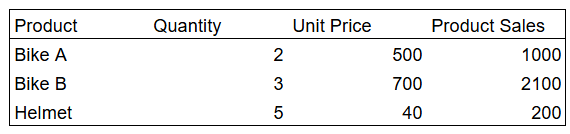
Let's say we created a calculated column
Product Sales = CALCULATE([Total Sales])
A calculated column already has row context because DAX evaluates the expression one row at a time.
- Product = Bike A
- Quantity = 2
- Unit Price = 500
DAX knows which row it is on, but that row doesn't have a filter on it. When CALCULATE runs inside a row context, it uses the values from the current row as filters for the calculation.
This change from 'I am on this row' to 'filter the calculation by this row' is context transition,
The result is
Why context transition matters
Row context tells DAX "Which row am I currently working on?" but row context by itself doesn't automatically filter a measure.
Measures are calculated using filter context. So if we want the current row to affect a measure, DAX needs a way to turn that row into filters.
That's what context transition does. CALCULATE takes the values from the current row and applies them as filters when evaluating the measure.
Context Transition with SUMX
SUMX creates row context because it goes through a table one row at a time.
Example:
Without CALCULATE = SUMX(Sales, SUM(Sales[Quantity]))
The total quantity in the table is:
2 + 3 + 5 = 10
SUMX starts on the first row, so there is a row context.
However, SUM(Sales[Quantity]) does not use that row context as a filter.
It still sees the whole Sales table and returns 10.
The same happens for every row:
Bike A row → SUM(Quantity) = 10
Bike B row → SUM(Quantity) = 10
Helmet row → SUM(Quantity) = 10
SUMX then adds those results:
10 + 10 + 10 = 30
Now add CALCULATE:
With CALCULATE =
SUMX(Sales, CALCULATE(SUM(Sales[Quantity])))
SUMX still creates the same row context.
But now CALCULATE turns the current row into filter context.
So on the first row:
Current row = Bike A
Quantity = 2
↓ CALCULATE
Filter = current Bike A row
↓
SUM(Quantity) = 2
On the next row:
Bike B → 3
And on the final row:
Helmet → 5
So SUMX now adds:
2 + 3 + 5 = 10
This shows the difference clearly:
- SUMX without CALCULATE → 10 + 10 + 10 = 30
- SUMX with CALCULATE → 2 + 3 + 5 = 10
SUMX gives DAX a current row.
CALCULATE makes that current row filter the calculation. That is why CALCULATE matters here.
Summary
Context transition connects row context and filter context.
SUMX creates row context by moving through a table one row at a time.
CALCULATE can do several things to filter context, such as adding, replacing, or removing filters. But when it runs inside an existing row context, it also performs context transition.
SUMX creates row context. CALCULATE performs context transition when a row context exists.