


Have you ever wondered what actually happens behind the scenes when you hit run on a SQL query? Today, we learned about Snowflake's architecture, and what I found particularly interesting was how Snowflake divides responsibilities across three layers: Cloud Services, Compute, and Storage.
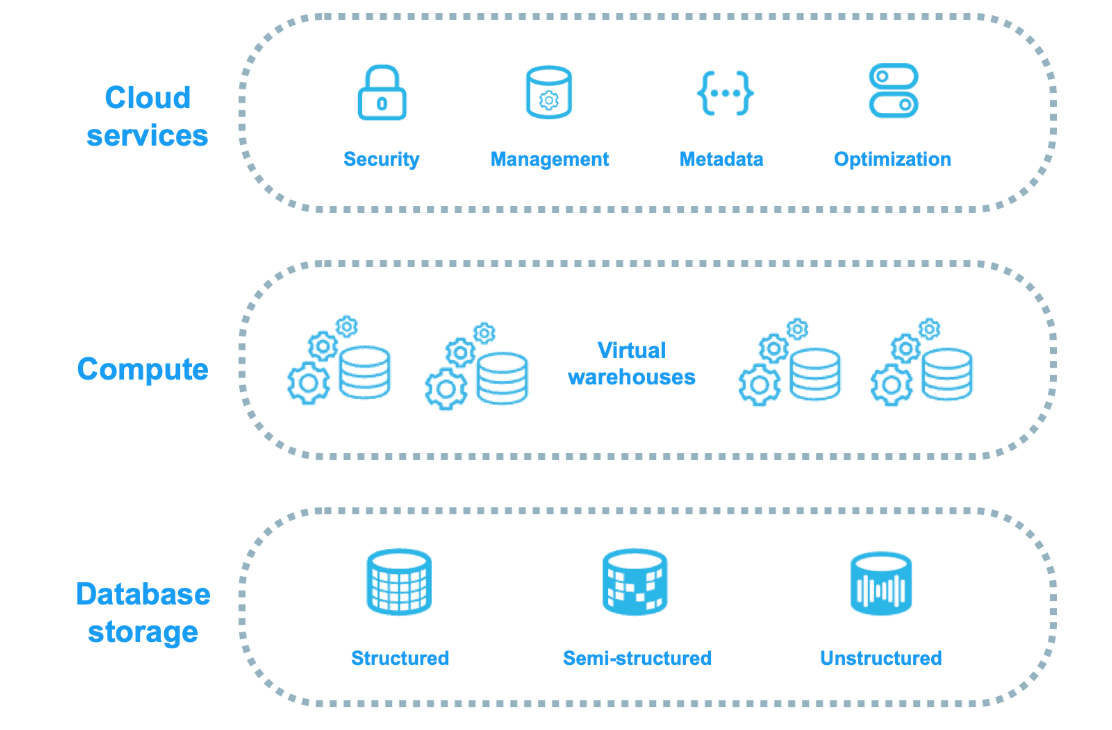
Let's see how they work together.
1. Cloud Services: The Coordinator
Before you even start running queries, Snowflake's Cloud Services is already at work. Think of it as the Coordinator. It checks who you are (authentication), what you're allowed to do (authorization), and, when you submit a query, figures out an efficient way to execute it. Once everything is organized, it hands the work over to Compute.
2. Compute: The Worker
This is where the heavy lifting happens!
Snowflake uses virtual warehouses to execute queries and process data. But here's something interesting: if your table contains 100 million records and you only need data from 2026, does Snowflake really need to scan everything?
Not necessarily!
Using metadata and a technique called micro-partition pruning, Snowflake can avoid scanning irrelevant portions of the data, making queries more efficient.
3. Storage: The Library
Obviously, all this data needs to live somewhere!
That's where Storage comes in. Snowflake automatically organizes data into smaller units called micro-partitions. Think of a library where books are organized into sections. Instead of searching every shelf, you use the catalog to find where you need to look. That's essentially how micro-partitions and metadata help Snowflake find relevant data efficiently.
4. Why Separate Storage and Compute?
This was probably my favorite part.
Snowflake allows companies to store their data without constantly running computing resources. Need more processing power? Scale up your virtual warehouse. Done analyzing? Suspend it. This separation provides flexibility and helps organizations manage costs.
My Takeaway
So, next time you run a query in Snowflake, remember:
Cloud Services: The Coordinator that organizes the work.
Compute: The Worker that executes the query.
Storage: The Library that keeps the data organized.
What I learned today is that writing SQL is only part of the story. There's quite a lot happening behind that little Run button!
Further Reading
- Snowflake Architecture Overview — Understanding the three architectural layers.
- Virtual Warehouses — How Snowflake processes queries.
- Micro-partitions and Data Clustering — How Snowflake organizes data and improves query efficiency.