


In last week’s Tableau session, we built a set of date based KPIs in Tableau using a selected current date.
The aim was to compare profit across different time periods, rather than just showing one number on its own. We started with wider comparisons like current year vs previous year, then worked down into more specific ones like month to date and day level comparisons.
What made the session useful was that each KPI followed the same general idea, but with a slightly different time window. It was a good way to practice date logic and see how changing the definition of the period changes the meaning of the KPI.
Starting with a selected current date
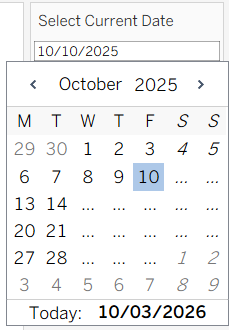
Everything in the workbook is driven by a parameter that acts as the current date.
That makes the calculations much easier to test. Instead of relying on TODAY(), you can move the date around yourself and check whether the logic still works at different points in the year.
That is especially useful for year to date and month to date calculations, where it is easy to think something is right until you test it with a different date.
Current Year Profit vs Previous Year Profit
The first KPI we built was current year profit compared with previous year profit.
This was the broadest comparison in the session. The logic is fairly simple. One calculation returns profit where the order date falls in the same year as the selected current date:

The other returns profit where the order date falls in the year before that:

Both calculations are using the parameter we created earlier.
It is a useful starting point because it introduces the basic structure for all the other KPIs. First define the current period, then define the comparison period, then return the measure for each.
This kind of view gives a quick high level comparison, but it does have limits. If the current year is still in progress, comparing it with a full previous year is not always the fairest comparison.

Current YTD vs Previous YTD Profit
That leads into the next KPI, which was current year to date profit compared with previous year to date profit.
This is usually a more useful comparison during the year, because both periods are cut off at the same point. So if the selected current date is somewhere in March, both calculations only include data from 1 January up to that point in each year:


This was a good example of how two KPIs can look very similar on the surface, but answer slightly different questions. Current year vs previous year gives you a broader picture, while YTD vs previous YTD gives you a like for like comparison.

Current Month vs Same Month Last Year
After that, we moved from year level comparisons down to month level ones.
The first monthly KPI was current month profit compared with the same month last year. This takes the selected current month and compares it with the matching month one year earlier.
This is a useful comparison because it helps account for seasonality better than simply comparing with the previous month. Comparing March with February can be useful, but comparing March this year with March last year often gives a more meaningful view.
Again, the logic follows the same pattern as before. Identify the selected month, then identify that same month one year earlier, and return profit for each.

Current Month TD vs Same Month Last Year TD
Next, we made that month comparison more precise by switching to month to date.
Instead of comparing full month totals, this KPI only includes data from the start of the month up to the selected current date. The comparison period does the same thing, but for the equivalent point in the same month last year.
This is a better comparison when the current month is still ongoing. If your selected date is part way through the month, comparing that partial month with the full month from last year would be misleading. Month to date solves that problem.

Current Day vs Same Day Last Year
The final KPI we built was current day profit compared with the same day last year.
This was the most detailed comparison we built. It just checks whether the order date matches the selected date, then compares it with the same day last year.
It was a good way to finish because the logic was still basically the same as the earlier KPIs, just on a smaller time period.
