


Are you currently working on a data migration using dbt? Perhaps you're refactoring or optimising existing models and need to ensure your changes haven't impacted the final output? If so, validating your new models against their legacy versions can be a daunting final step. Enter dbt-audit-helper!
The dbt-audit-helper package contains a collection of useful macros that allow you to compare new models and queries against their original versions. This makes it particularly useful for data migrations and optimisation projects, helping you identify discrepancies and ensure your changes haven't introduced any unexpected differences.
How to get and use dbt-audit-helper
First, access the following link to get to the correct site.
Copy the installation code provided on the page. This ensures you're using the latest version of the package.

In your dbt studio, navigate to your packages.yml file (or create one if it doesn't yet exist). This should contain a list of all packages you have installed/wish to install.
If this is empty, paste the entire code into the file. If you already have a package in this document, paste the dbt-audit-helper code but remove the packages: header, and ensure they are aligned/tabbed consistently with your other packages.
Your packages.yml may look something like:
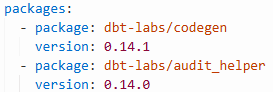
For the final step - run dbt deps in your command window to install the packages listed in your packages.yml file.
Useful macros with the dbt-audit-helper package
If you scroll down on the same link, you will see a long list of macros, each of which contains useful macros you can perform for your audits.
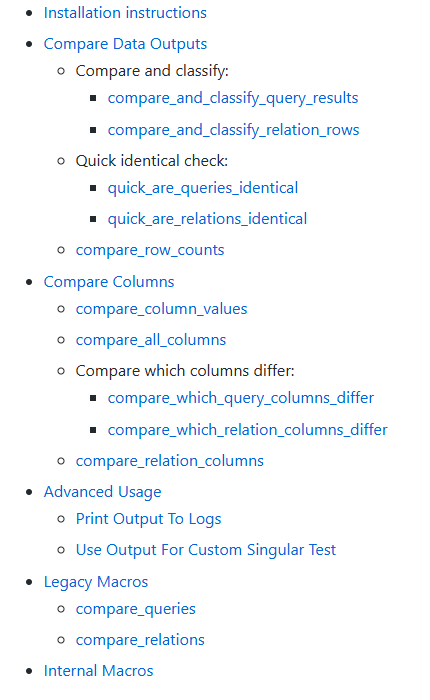
To summarise these, there are 3 key categories:
1 - Compare Data Outputs:
- These macros help compare the overall outputs of two queries or relations.
- For example,
quick_are_relations_identicalreturns a single boolean value indicating whether the two relations are identical.
2 - Compare Columns:
- These macros provide a more detailed comparison of individual columns between two queries or relations.
- They help identify differences in values, missing records and null values, making it easier to pinpoint where discrepancies are occurring.
3 - Advanced Usage:
- These macros help you make your audit results more accessible and reusable throughout your dbt project.
- They aren't comparisons themselves, but instead allow you to log results or incorporate comparisons into your testing workflow.
- Print Output to Logs - this allows you to print the output of your
dbt-audit-helperquery to a log, giving it more permanence and allowing your team to see these results, instead of previewing these on your device alone. - Use Output For Custom Singular Test - if having identical queries is critical to your project, you can create a Singular Test using this package to protect your models against unwanted changes during your migration.
Note: these are all documented here
Some interesting macros to note:
Compare_row_counts- does what it says on the tin. A super easy way to ensure your row counts are identical for new and legacy models.Compare_all_columns- useful for comparing the results from all column values across both models. The results essentially count the number of rows/cells from each column based on whether the values:- match perfectly
- differ
- are null in one or both queries
- are missing from one query but not the other
Queries and Relations - What's the difference?
Many of these macros are essentially duplicates, based on whether you are testing relations or queries. Although these macros perform similar comparisons, there is an important distinction between the two.
- Queries: SQL statements that you want to compare.
- Relations: Existing database objects, such as tables or views, that you want to compare.
dbt-audit-helper in practice
To show how these work, I have 2 models called legacy_subscriptions and fct_subscriptions, where the latter is my newest of the two. The columns for both are as follows:

Let's see if there are any differences between these. Note: if you would like to follow along, I have pasted the SQL queries for these at the end. No spoilers!
Test 1: Compare row counts
I don't know about you, but I love a row count check. It's such a quick and straightforward way to identify any key discrepancies between two models, and can imply certain joins or unions have gone wrong, or duplicates are being introduced, to name a few things.
To implement this, we can use the same link to look for the macro compare_row_counts. Selecting this will take you here, in the dbt-audit-helper repository, which provides all the necessary tests you can copy and paste directly into your project.
So for compare_row_counts, we need to copy the following:
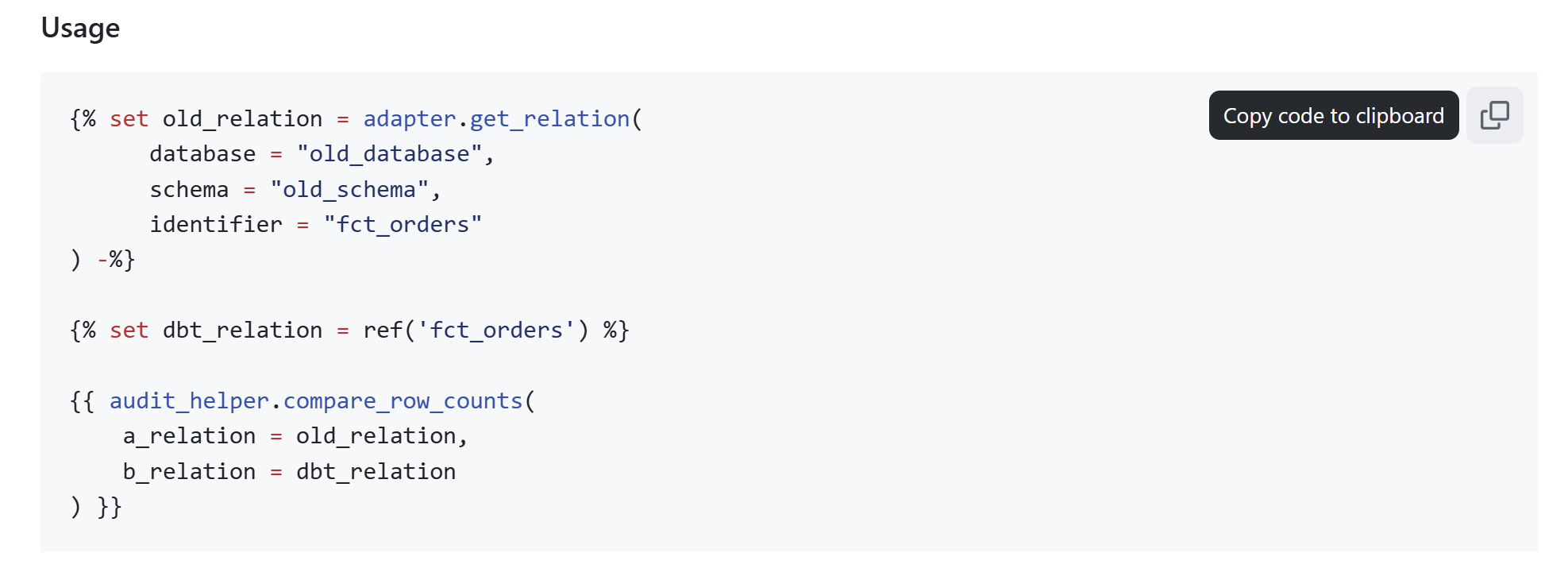
And paste it into our project. In my project, I've created a file called audit-helper-tests.sql which I will be using to execute all of these.
Firstly, I need to paste this in, and provide the correct database, schema, and name for my models. Here the model names are in purple boxes to make this clear.
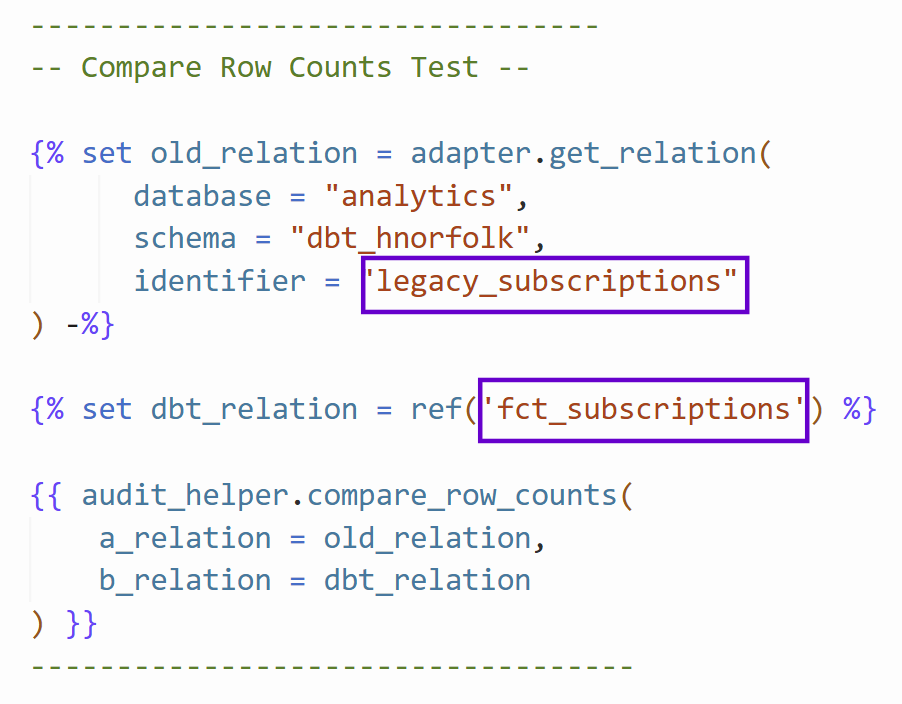
To execute, simply highlight over the code, and press Preview (or Ctrl + Enter for Windows).
Your results window will look like the following:

Meaning there are the same number of rows for both models, which is good news so far! It may be worth quickly seeing if there are any changes between these at all before we dig further.
Test 2: Quick_are_relations_identical
The row count seems consistent - perhaps there isn't a difference between our 2 models?
Let's run a quick_are_relations_identical query to see if the outputs of these are the same or not.
Note: quick_are_relations_identical currently only supports Snowflake and BigQuery. Check the package documentation for the latest adapter compatibility.
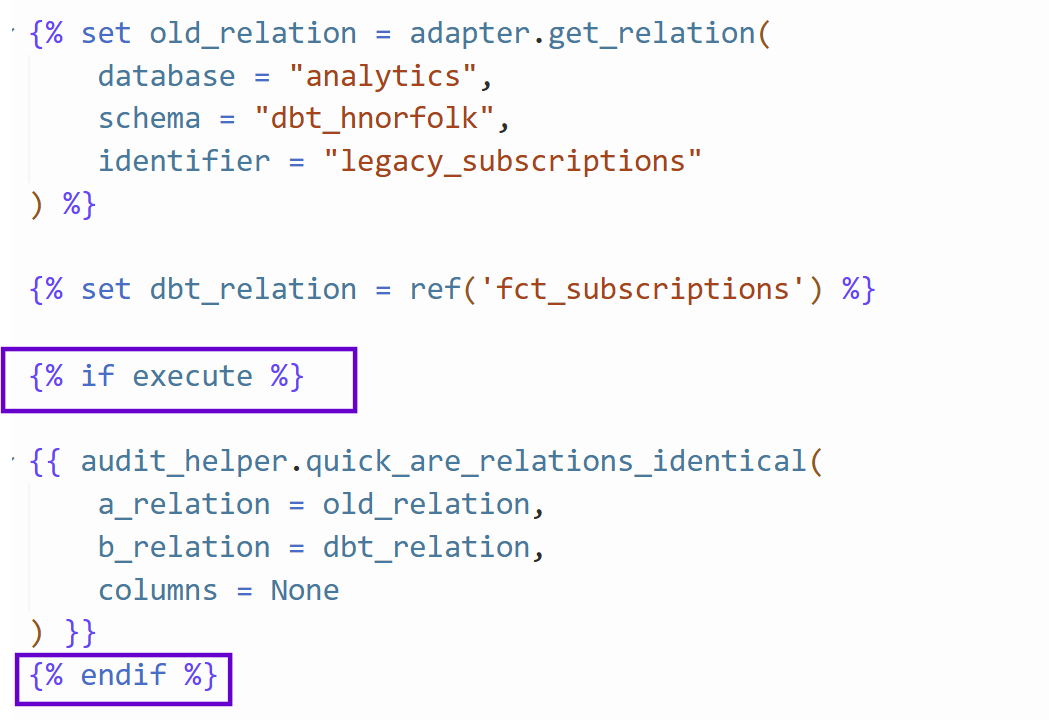
Using the dbt link again, I've copied the relevant code, and pasted it into my audit-helper-tests.sql file, and wrapped the second half of the code in a jinja {% if execute %} function (see purple boxes). Wrapping this section in {% if execute %} ensures that the code only runs during dbt's execution phase, rather than during parsing. This is particularly useful here because the macro needs to inspect the database relations to identify their columns. Without this, it cannot automatically identify matching columns from each model!
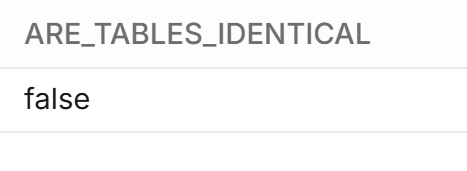
Previewing this code will show you that the queries are in fact, not identical, and more digging is required.
Test 3 - Compare all columns
This query, compare_all_columns, gives us a better idea of key discrepancies between our two models.
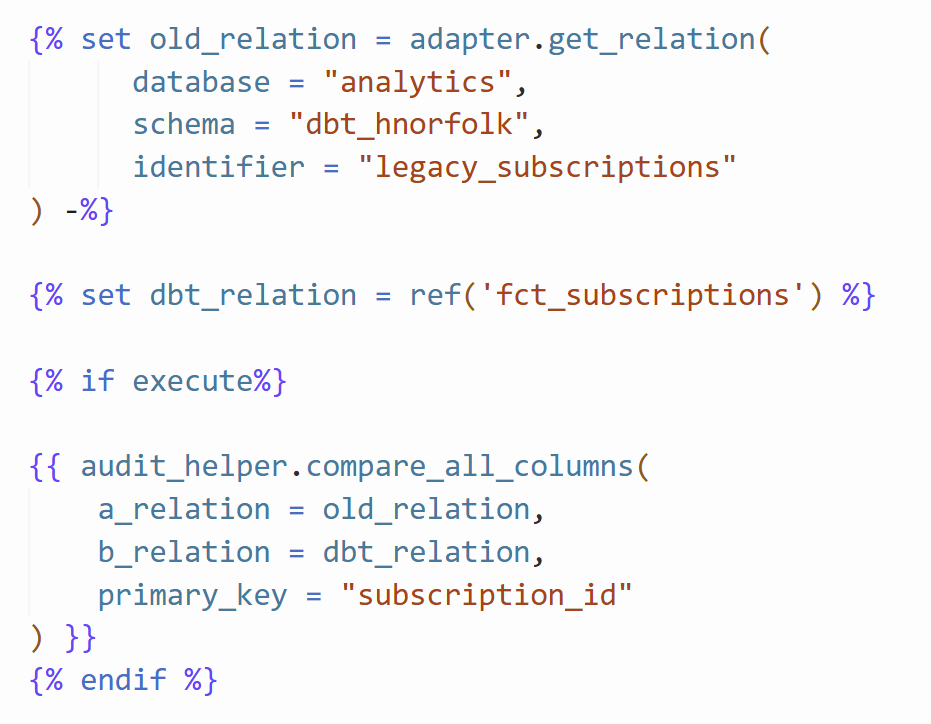
Same drill as before: copy code, paste, add jinja execution statement, and update the details. Something to bear in mind: this macro relies on a primary key to match records between your two models. This should be unique and non-null in both relations; otherwise, the comparison may not work as expected.
Results are as follows:

The results here are interesting: given both models have the same number of rows, there are some discrepancies across all columns. This could suggest individual rows are being added or excluded, or perhaps both, from both models.
This is a useful tool for seeing whether certain columns are more impacted by discrepancies than others, but these results suggest we should instead see what's changing at the row level.
Test 4: Compare and Classify Relations Rows
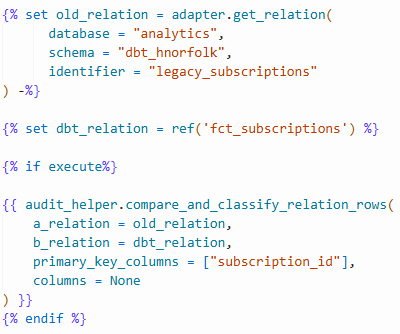
Now that we know our models aren't identical, let's identify exactly what's changed. This is where compare_and_classify_relation_rows becomes particularly useful
Let's preview the following:
The result is a much wider table - you may have also noticed that there are 7 rows in total, instead of the expected 5.

This clearly illustrates 3 changes from legacy_subscriptions to fct_subscriptions:
- Subscription 202 has been modified - the monthly fee has increased from £25 to £30
- Subscription 204 has been removed from the new model
- Subscription 206 has been added to the new model
So, given 3 subscriptions were identical, 1 was removed, 1 was added, and 1 was modified, meaning it's outputted twice, this explains why there are 7 rows total.
The most useful column, in my opinion, is dbt_audit_row_status. This clearly illustrates additions, removals, and modifications being made to the new model in relation to the old model.
The models in question
Let’s take a look at legacy_subscriptions and fct_subscriptions:
legacy_subscriptions:

fct_subscriptions:

Now we can see those 3 changes very clearly!
Final Thoughts
The dbt-audit-helper package is a really useful addition to your dbt toolkit, particularly when working on data migrations, refactoring or optimising existing models.
With a range of macros available, you can quickly move from checking whether two models are identical to identifying exactly which rows and columns contain discrepancies.
For me, the biggest benefit is the visibility this provides when making changes to existing data models. Rather than simply hoping your new models produce the same results, you can systematically compare the outputs and investigate any unexpected differences before making the switch.
Follow Along SQL Queries
Please note that these models have solely been created to test how the dbt-audit-helper package works, hence they are standalone models with no lineage.
legacy_subscriptions:
WITH legacy_subscriptions AS (

    SELECT 201 AS subscription_id, 101 AS customer_id, 'Basic' AS plan, 10.00 AS monthly_fee, 'Active' AS status
    UNION ALL
    SELECT 202, 102, 'Premium', 25.00, 'Active'
    UNION ALL
    SELECT 203, 103, 'Basic', 10.00, 'Cancelled'
    UNION ALL
    SELECT 204, 104, 'Premium', 25.00, 'Active'
    UNION ALL
    SELECT 205, 105, 'Standard', 15.00, 'Active'

)

SELECT *
FROM legacy_subscriptions
fct_subscriptions:
WITH new_subscriptions AS (

    SELECT 201 AS subscription_id, 101 AS customer_id, 'Basic' AS plan, 10.00 AS monthly_fee, 'Active' AS status
    UNION ALL
    SELECT 202, 102, 'Premium', 30.00, 'Active'
    UNION ALL
    SELECT 203, 103, 'Basic', 10.00, 'Cancelled'
    UNION ALL
    SELECT 205, 105, 'Standard', 15.00, 'Active'
    UNION ALL
    SELECT 206, 106, 'Premium', 25.00, 'Active'

)

SELECT *
FROM new_subscriptions