


Level of Detail (LOD) calculations can be a daunting thing when you are new to Tableau, but understanding them can make your analysis so much easier. In this blog I will guide you through how to use Fixed LOD's in Tableau.
What is a Fixed LOD calculation?
A fixed LOD allows you to do a calculation at a specific level of granularity, regardless of what is in the view. Putting a calculation in a fixed LOD will mean it compute based on the chosen dimensions, and won't change as you add more dimensions into the view.
The Syntax for a Fixed LOD is:

Simple terms: Fixed to the level of detail of dimension 1 and dimension 2, compute the calculation, regardless of any other dimensions in the view.
Tableau Example:
Using the Superstore dataset, I have created a table for the top 10 customers by Sum of Sales:
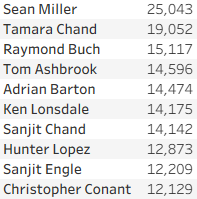
I have then created a simple fixed LOD calculation as follows:

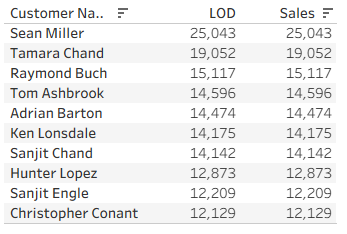
What this means: calculate sum of sales at the level of detail of each customer, so treating each row as a customer. I have put the LOD and Sum of sales side by side in the table and they are currently the same value:
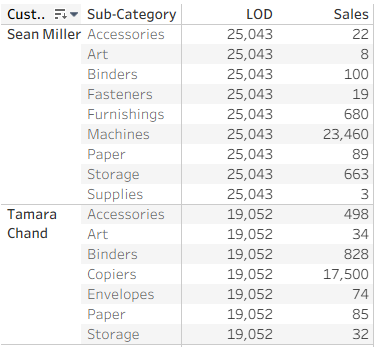
Now I will add Sub-Category to rows. As seen below, the value of the LOD stays the same, because it is FIXED to the level of detail of the customer name, but the Sum of Sales now changes to the customer's sales per Sub-Category.
Final thoughts:
Fixed LODs are an incredibly powerful tool once you get the hang of them. Standard calculations will change when the view changes, LOD's will stay the same. They will often be far more complicated this, but the guide aims to give a base understanding that you can bring with you when your analysis requires more difficult LOD calculations.