


When you first dive into SQL, a simple SELECT statement paired with a few JOINs is usually enough to get the job done. But let's be real, real world data questions tend to be messier and more complicated, forcing your queries to require more horsepower.
That is where Subqueries and Common Table Expressions come in. Both tools allow you to write more complex, multi-layered queries that you can nest into each other or reference later in your main query. Think of them as a way to break down intimidating data problems into smaller, more manageable parts.
To see them in action, let's look at how they'd each respond to the following challenge: "Finding all employees who earn more than the average salary in their respective departments". After we look at the code, I'll break down why one of these methods completely outshines the other!
Subqueries
Like the name implies, a subquery embeds a query inside another statement (usually within the WHERE or FROM clause). In this example, the inner query calculates the average for a specific department, and the outer query uses that number to filter the employees.
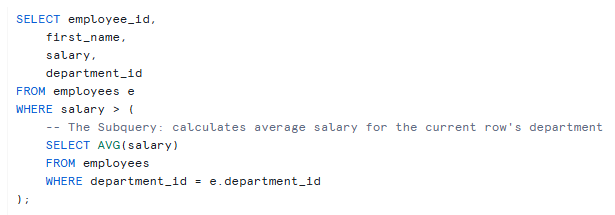
How this works: The database will run the inner query (subquery) first by aggregating salary to find the average salary for each department. Then it will run the outer query by filtering all employees to return only those whose salary is greater than the result of the subquery.
Note: A subquery doesn't have to return a single value, but it does have to return exactly what the outer query expects. If you use = or >, it expects a single value. If you use IN, it expects a list. If it's in the FROM clause, it expects a table.
Limitation: While Subqueries are logically closer to the natural way we think through our solutions to data problems, the more complex or nested they become the harder is is for the user to read - as they are read from inside out.
Common Table Expressions (CTEs)
A CTE acts like a temporary, named result set that you define at the very beginning of your query using the WITH keyword. It makes your code highly readable because it reads from top to bottom, almost like creating a temporary table on the fly. In this example, the CTE calculates the departmental averages first inside a temporary result set which is then joined to the main query to filter the high-earning employees.
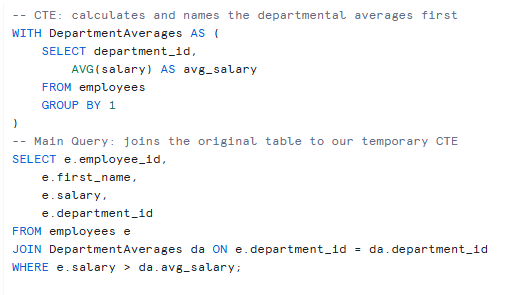
How this works: This changes the order that we think about the data. Instead of trying to calculate averages while filtering employees at the exact same time, a CTE lets us pause, calculate the averages first, and then use that finished calculation just like a regular table.
Note: The database doesn't actually create a real table on your hard drive, it just holds a temporary view of the data in memory for the duration of that single query. Hence, CTEs don't consume storage space because they are just temporary.
Limitations: Adding to the above a CTE only exists for the one single query it is attached to. The moment that query finishes running, DepartmentAverages vanishes into thin air. You cannot reference it in a separate SQL statement down the page (unlike a View or a Temp Table).
Why CTEs are "Better"
The preference for CTEs almost entirely comes down to human engineering, how we read, write, and maintain code.
1. They Save Your Sanity (Readability)
Subqueries force you to read code from the inside out, like a Russian doll. If you have a subquery inside a subquery inside a subquery, your brain will melt trying to track the parentheses. A CTE on the other hand, reads from top to bottom just like a recipe. Think of the CTE as your ingredients and your main query as your cooking instructions.
2. The "Write Once, Use Everywhere" Feature
If you need to use the exact same temporary dataset three different times in a complex report (e.g., in a JOIN, a WHERE clause, and a UNION), a subquery forces you to copy-paste the exact same code three times. With a CTE, you write it once at the very top, give it a name, and reference it whenever you need it without having to write the code again.
3. They Can Do Magic (Recursive Queries)
There is a special type of CTE called a Recursive CTE. This allows a CTE to reference itself. It is the only elegant way in SQL to loop through hierarchical data, like an organizational chart (Who reports to whom?) or a bill of materials (What parts make up this machine?). Subqueries flat out cannot do this.
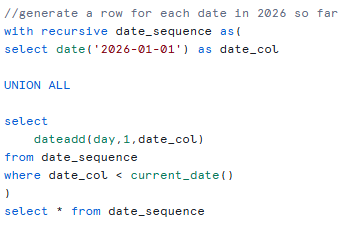
Example: Generating a row for each date in 2026 until today, using a recursive CTE. Note how it references itself date_sequence in the from statement inside the CTE - this essentially allows it to build upon itself by adding a day to the previous iteration starting with 2026-01-01 as iteration 0. The WHERE clause is important here because the database will check if the date created from the previous iteration is less than today and only if that's true it will create the next row. Without the WHERE clause the query would go forever so remember to include it!
Why You Absolutely MUST Still Know Subqueries
1. The Quick Check
If you just need a single, quick calculation to filter a row, writing a whole CTE block at the top of your script is excessive effort. A subquery lets you drop a quick calculation right into your WHERE clause.
2. Reading Other People's Code
CTEs were only added to the official SQL standard in 1999, and many databases didn't adopt them until years later. If you step into a company that has been around for a while, you will inherit miles of legacy SQL written entirely with subqueries. If you don't know how to read them, you won't be able to fix or modernize them.
Conclusion
Ultimately, mastering both CTEs and subqueries transforms you from someone who just queries data into a true SQL architect.
While subqueries remain your go-to tool for quick filtering, CTEs elevate your scripts by turning tangled, nested code into clean, logical pipelines. By leaning on CTEs for your heavy lifting and subqueries for your quick checks, you will build scripts that don't just run flawlessly, they are incredibly easy to read and maintain. When a data emergency hits six months from now, or a teammate inherits your project, your clean code means your future self and your team will absolutely thank you.