


In Alteryx, formulas are used to clean data, format fields and find insights. In this blog I will go into more detail about the key formulas used and the some of tools in which they're used.
The tools where you would use formulas most:
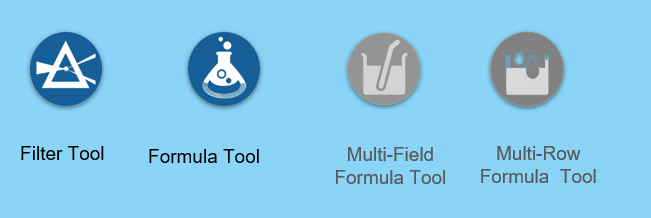
Today I will be focusing on the filter and formula tool.
Filter Tool:
- Allows the selection of specific subsets of data that fulfil user-specified conditions
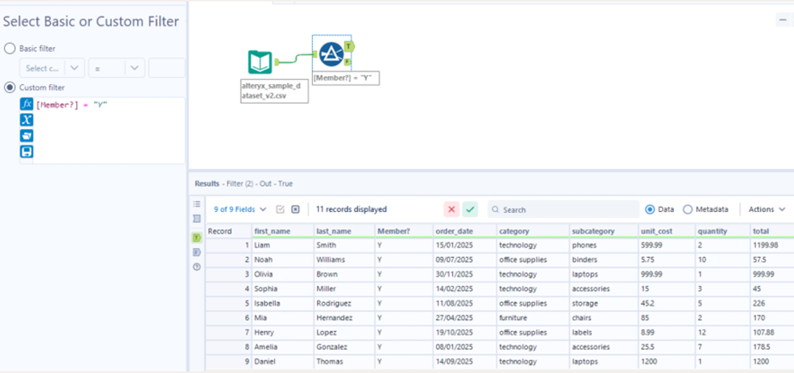
- Below is an example of how the formula and filter tool are used.
- The filter is working row by row.
- The tool produces a true and false anchor which you can carry on the work flow from.
- This is slightly different to tableau where the data is removed in a filter.
Formula Tool:
- Allows the creation of new data using your current data
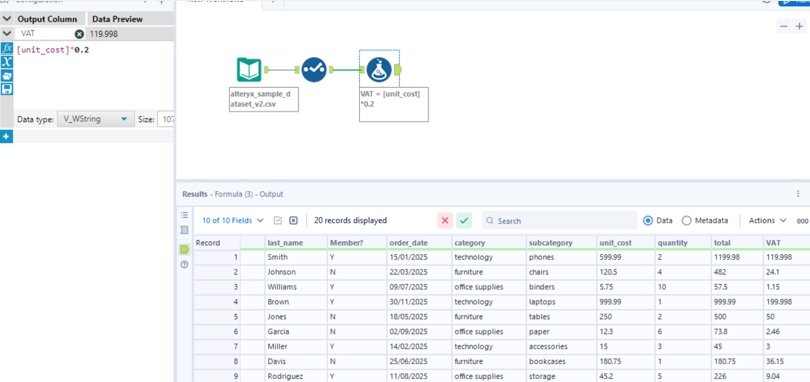
- Below is an example of how a formula has been used to create a new column VAT.
- On the left hand side you can see the formula.
- The formula is also working row by row.
See some formulas you may come across when first being introduced to Alteryx, if you familiarise yourself with them then you'll be able to move on quickly to more advanced alteryx challenges.
STRING:
- PROPER(): Capitalizes the first letter of each word.
- Example:
PROPER("liam smith")→ "Liam Smith".
- Example:
- TRIM(): Removes extra spaces from the beginning or end of text.
- Example:
TRIM(" hello ")→ "hello".
- Example:
- LEFT(): Extracts a specific number of characters from the start of a string.
- Example:
LEFT("Alteryx", 3)→ "Alt".
- Example:
NUMERIC:
- Basic Math: Standard operations like addition, subtraction, division and multiplication. (+,-,/,*)
- Example:
[unit_cost] * [quantity]to calculate a total.
- Example:
- ABS(): Returns the absolute value (removes negative signs).
- Example:
ABS(-85)→ 85.
- Example:
- ROUND(): Rounds a number to a specific decimal place.
- Example:
ROUND(12.345, 2)→ 12.35
- Example:
CONDITIONAL:
- IF Statement: Tests a condition and returns a specific value if true.
- Example:
IF([total] > 100, "High", "Low").
- Example:
- ISNULL(): Checks for missing or empty values.
- Example:
IF(ISNULL([total]), 0, [total]).
- Example:
- AND/OR: Combines multiple conditions for more complex logic.
- Example:
IF([Sales] > 50 AND [Region] = "East", "Target Met", "Not Met").
- Example:
DATE FUNCTIONS:
- DateTimeToday(): Returns the current system date.
- Example:
2025-10-05.
- Example:
- DateTimeDiff(): Calculates the interval between two dates in specific units like days or months.
- Example:
DateTimeDiff([ship_date], [order_date], "days").
- Example: