


Last week we had the opportunity to select data, understand it, then organize it so it would be useful for our user stories that we created. I picked data from Bureau of Transportation Statistics. Specifically choosing flight data in January for flights to and from New York ( these limitations were chosen as Snowflake can't import file sizes larger than 250 mb).
Being one of the largest most organized industries in the world that requires 24/7 surveillance and communication. Organizing data so it is quickly retrievable and comprehensible is essential, data integrity becomes critical.
For practical application here are the User stories that I developed
Use Case 1 - Airport Operations Manager
As an Airport Operations Manager, I want to monitor flight performance, delays, and cancellations so that I can identify operational bottlenecks and improve overall airport efficiency.
Use Case 2 - Airlines Strategy Manager
As an Airline Strategy Manager, I want to compare airline performance and identify trends across different routes so that I can make more informed strategic decisions.
I initially asked myself why would I need to organize this data especially if I were an expert in the field and had been in the industry for 5+ years I would most likely know the data I am working with and know exactly what to query to get the answers I need. However that's where a relational database model does far more than just organizing our data.
Let's imagine you're an experienced airline data analyst
You have 10 years of experience working with airline performance data. You're comfortable with SQL and have a large table containing millions of flight records.
You know exactly which columns to query when investigating delays, cancellations, or airline performance.
So why change anything?
For your immediate analytical needs, you might not need to.
If your data is clean, your queries are fast, and you're the only person using it, maintaining a single large table could be perfectly reasonable.
But now imagine the company grows.
- Another analyst needs to understand your data without your help.
- The operations team and strategy team start defining metrics differently.
- The airline reference data changes.
- New flight records arrive every day.
- Your dashboard needs to refresh regularly without rebuilding complex transformations.
Given how large the air travel industry is, with global airline revenues estimated at $908 billion in 2023, according to the International Air Transport Association (IATA), data needs to be communicated and used 9across teams and regions. This makes consistency increasingly important.
Consider these two designs:
Raw Data Column Headers:
Organized into a relationship database models:
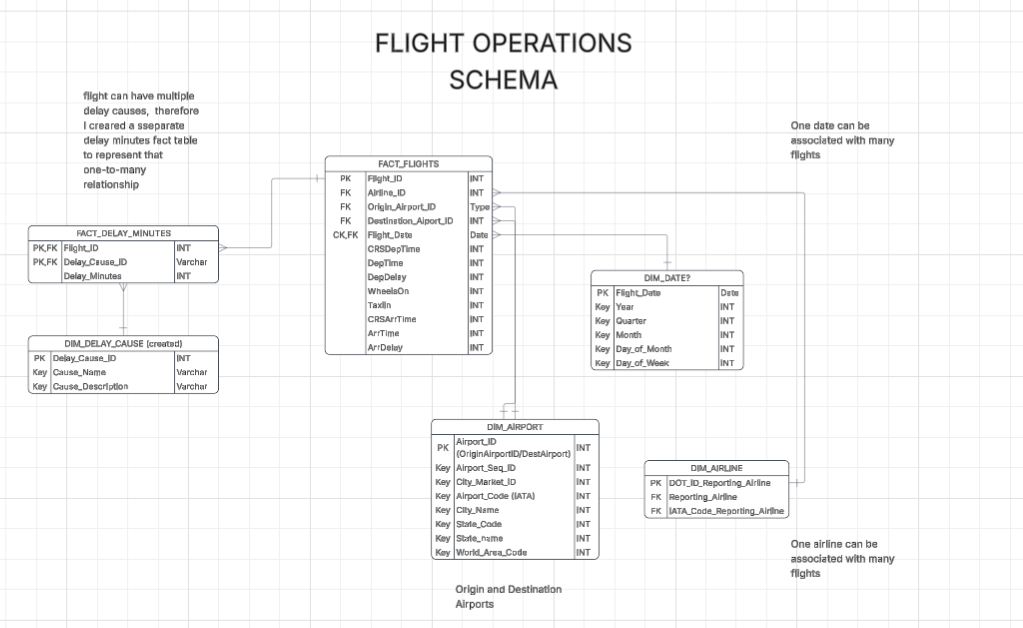
An Operations Manager might use detailed flight and delay information, while a Strategy Manager might primarily use airline, airport, and route information.
The important point is that both users can retrieve information from the same underlying data without needing to maintain completely separate datasets.
This also allows us to establish common definitions and relationships, making the data easier to maintain and reuse.
How Do We Actually Create These Tables in Snowflake?
This is where Data Definition Language (DDL) and Data Manipulation Language (DML) come into play.
DDL allows us to create and modify the structure of our database using statements such as CREATE TABLE and ALTER TABLE.
DML, on the other hand, allows us to work with the records stored within those tables using statements such as INSERT, UPDATE, and DELETE.
For this project, DDL was useful for establishing the structure of the new tables, while DML allowed us to populate and modify them using the information from our original dataset.
Rather than having to repeatedly query and restructure all the raw information, we could create tables that were already organized around the requirements of our users.
How do we actually set up a Primary Key in Snowflake?
CREATE or replace table FACTS_FLIGHTS (
FLIGHT_DATE DATE NOT NULL,
OP_UNIQUE_CARRIER VARCHAR(4) NOT NULL,
OP_CARRIER_FL_NUM VARCHAR(10) NOT NULL,
ORIGIN_AIRPORT_ID INT NOT NULL,
DESTINATION_AIRPORT_ID INT NOT NULL,
CRSDEPTIME INT,
DEPTIME INT,
DepDelay INT,
WheelsON INT,
TaxiIn INT,
CRSARRTIME INT,
ArrTime INT,
ArrDelay INT)

PRIMARY KEY (  -- primary key is set up here
    FLIGHT_DATE,
    OP_UNIQUE_CARRIER,
    OP_CARRIER_FL_NUM,
    ORIGIN_AIRPORT_ID,
    DESTINATION_AIRPORT_ID
)
);
My Primary Key was a primary composite key ( meaning it was made up of multiple fields )
For this project, table relationships were established by linking composite primary keys across our fact and dimension tables. In the future, I would also formally define foreign key constraints in Snowflake so the relationships don't have to manually assigned.
Conclusion
my biggest takeaways from this project was understanding that organizing data isn't necessarily about making it easier for one person to query.
It's about making sure that the information can be consistently understood, maintained, and reused by different people with different requirements.
DDL and DML provide the tools to create and manage these structures, while relational database modeling helps us decide how the information should be organized.
Ultimately, the goal isn't to create as many tables as possible. It's to create a structure that makes our data reliable, reusable, and useful for the people who need it.