


If you're writing Python code in which you authenticate with an external system, you're likely using some kind of confidential secret (an API key, a password, a token, etc.). That's the kind of information you don't want to be publicly available so it would be a big mistake to type that directly into your Python code and then put it in a public repository on GitHub. A better way of dealing with that would be to use environment variables and a .gitignore file.
Creating the .env file
The .env file is where you'll be storing your secrets. Take a look at the repository I've created below, containing a simple Python script in which I download data from an API, authenticating with an API key and a secret key:
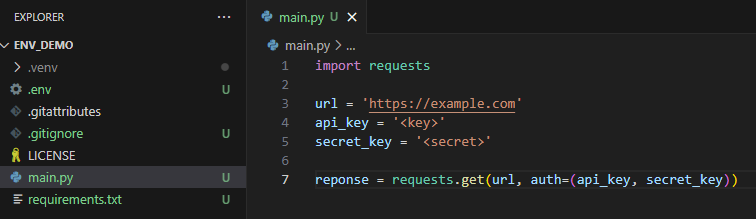
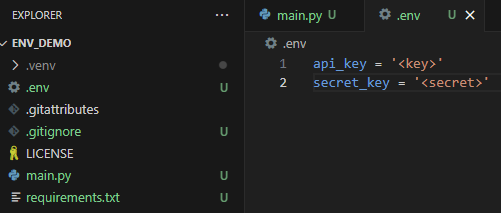
The API key and secret key exist directly in the Python script, which means that they'll be visible to anyone that can see the repository once I upload it to GitHub. A better way of doing this is to create a .env file, which is a text file containing key-value pairs that can be referenced in other files. Here's how that should look:
Referencing environment variables in Python
Once that file has been created, you can reference those values in the Python script using the dotenv and os modules (you'll need to run 'pip install dotenv' to have access to that). Here's how that's done:
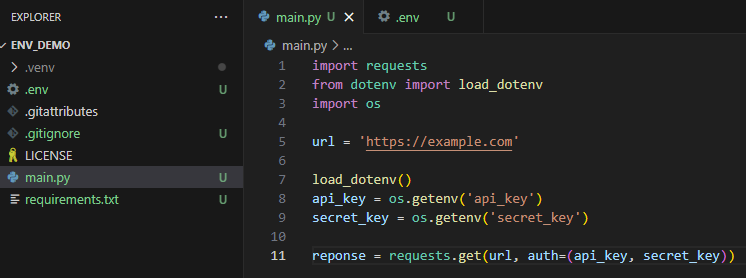
This way authentication with the API is still possible. However, it's impossible to tell what the values of the secrets are by looking at the Python script.
Adding the .env file to .gitignore
We're almost done but there's one very important step remaining. The secrets are no longer stored directly in the Python file but the .env file in which they're stored is still in the repository. Publishing the whole repository will still allow people to see the secrets.
We need to tell git that we don't want it to track our .env file (meaning that it won't publish it to GitHub). That can be managed using the .gitignore file, a file that lists all files and folders that git should skip when publishing the repository. For this example, it's as simple as creating a file called .gitignore and adding '.env' to it (you'll see that my .venv folder that contains information about my virtual environment is also being ignored):

I'm writing this in VS Code, which helpfully grays out any folders or files that are ignored in the explorer pane on the left. Note that .venv and .env are both grayed out. When I publish this to GitHub, no one will be able to see my API key and secret key.