


When web scraping, you might come across data which is laid out across multiple web pages from the same website. For example on https://books.toscrape.com we can see the data is spread across 50 pages. Manually adding 50 URLs to the text input tool would take too long and would be an arduous task.
Using a generate rows tool and a formula tool, you can generate the URLs for all 50 pages.
This example is going to be using https://books.toscrape.com and will be gathering information on the:
- Titles
- Price
- Rating
- Availability
for each book on the website.
When the URL in the text input looks like this

We can see that it is only taking the data from page 1 of the catalogue.

This displays 20 records in the output as there are 20 books listed on each page of the catalogue. In order to collect the data from all of the books, we have to use the data from all 50 pages of the catalogue.
The plan here is to use the generate rows tool to generate the numbers 1-50 as rows and then to join these numbers to the original URL before entering that into the download tool.

The first step is to alter the URL in the text input, removing everything after the "page-".

Then using a generate rows tool, generate 50 rows.
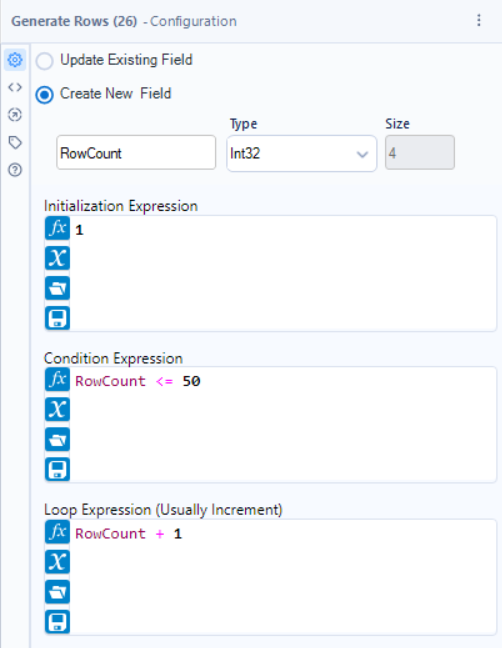
The output of the generate rows tool will look like this.
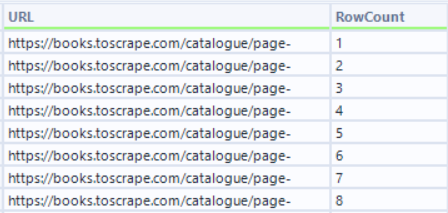
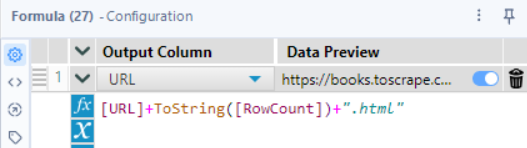
The next step is to then put these 2 fields together and then add a ".html" on the end using a formula tool to finish the URL.
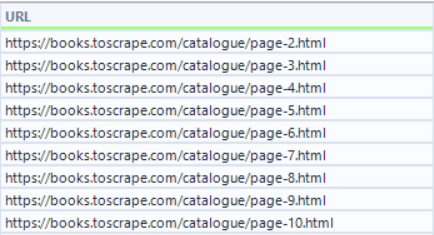
This is then what is put into the download tool.
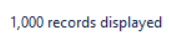
We can see that when run, all 1000 books from the website are displayed.